
Firefox
Your Firefox has been updated

WHAT’S NEW IN FIREFOX 157

The browser that has your back. Better than ever.

Your updated Firefox has a refreshed design and more ways to make it feel like home. Your bookmarks, extensions, and shortcuts are right where you left them.

Kit, the Firefox mascot, faces forward with paws outstretched and a large tail to the left, against a dark purple background.

3 things worth knowing

A collage of Firefox windows with different colors and backgrounds, including a desert, mountains, a basketball hoop, and a swing.

1. More ways to make it yours

New themes, wallpapers, and a homepage you can actually arrange. Change it once or change it anytime.

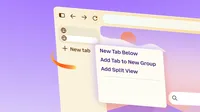
Illustration of a Firefox window with a tab menu open, showing “New Tab Below,” “Add Tab to New Group,” and “Add Split View.”

2. Refined, not reinvented

Cleaner toolbar, tidier tabs, less noise. Same menus, shortcuts, and extensions.

Illustrated Firefox window with a purple New Tab background, a centered search bar, and icons along the left sidebar.

3. Compact mode is back

You asked. We listened. Now you can shrink your toolbar and tabs, or let auto-compact handle it on smaller screens.

Ready when you are.

Keep up with all things Firefox

Get how-tos, advice and news to make your Firefox experience work best for you.