


See what’s new in Firefox!
Release Notes tell you what's new in Firefox. As always, we welcome your feedback. You can also file a bug in Bugzilla or see the system requirements of this release.
Download Firefox — English (US)
Your system may not meet the requirements for Firefox, but you can try one of these versions:
Download Firefox — English (US)
-
Download Firefox

-
Download Firefox
-
Download Firefox
-
Download Firefox
-
Download Firefox
-
Download Firefox
-
Download for Linux 64-bit
-
Download for Linux ARM64
-
Firefox for Android
-
Firefox for iOS
-
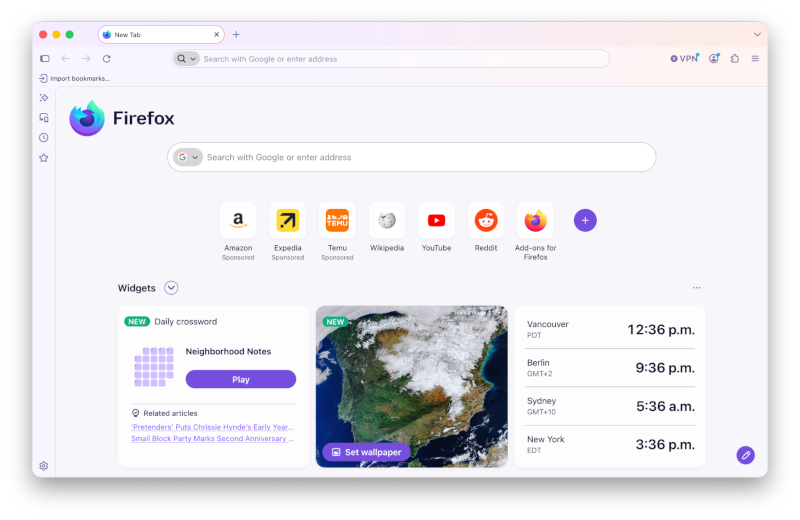
Firefox's biggest visual refresh in years is now available, with a modernized look across the browser toolbars, sidebar, menus and individual features, built with our updated design system. It also includes:
- New built-in themes with light and dark versions, to personalize the look of Firefox in one click.
- A new compact mode that reduces toolbar and tab spacing to leave more room for web content, useful on smaller screens and in split-screen layouts.
-
WebRTC video calls can now use hardware AV1 decoding on devices that support it, instead of always decoding AV1 video in software.
-
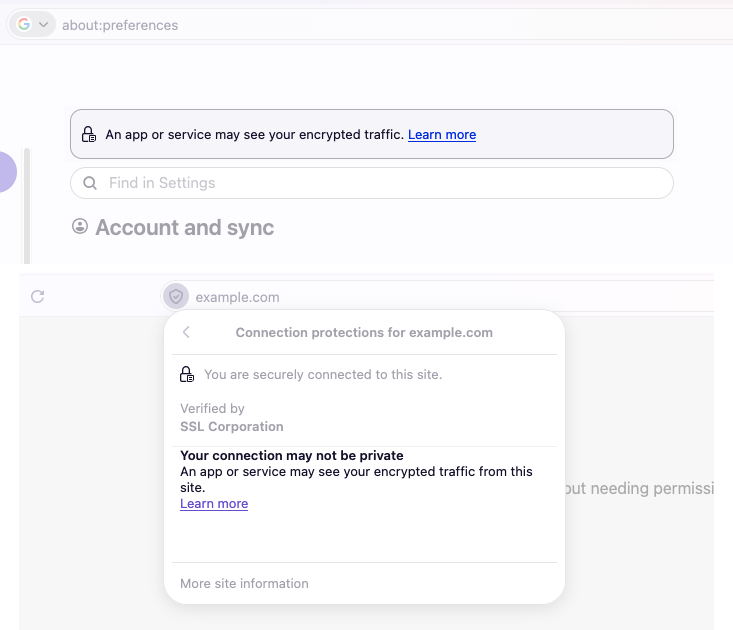
Firefox now shows a warning in the site information panel (the shield icon in the address bar) and in Settings when it has been set up to record its encryption keys, which could let other software on the computer read encrypted web traffic.
-
Firefox Suggest now offers suggestions in the address bar in Austria, Belgium, Czech Republic, Denmark, Finland, Hungary, Ireland, Luxembourg, Netherlands, Norway, Poland, Portugal, Slovakia, Spain, Sweden, and Switzerland. They can be controlled in the Firefox Suggest settings. Learn more.
Get the most recent version
Download Firefox — English (US)
Your system may not meet the requirements for Firefox, but you can try one of these versions:
Download Firefox — English (US)
-
Download Firefox
-
Download Firefox
-
Download Firefox
-
Download Firefox
-
Download Firefox
-
Download Firefox
-
Download for Linux 64-bit
-
Download for Linux ARM64
-
Firefox for Android
-
Firefox for iOS