
广告拦截器:实现个性化与专注浏览体验的工具。
在当今数字时代,网络世界有时可称得上纷繁杂乱。此时,广告拦截器成了强大的工具,可助您掌控浏览体验,并决定哪些内容能出现在屏幕上。
广告拦截器的运作方式可归结为两种:阻止内容(例如广告)加载、屏蔽网站中显示此类元素的部分。其中包括视频广告、在网络上跟踪您的个性化广告,甚至是第三方跟踪器。
广告拦截器使用起来十分简单。许多值得信赖的产品都提供了浏览器附加组件,很轻松就能找到贴合需求的选择。例如,Firefox 就推荐了一组认可的扩展,它们为改善浏览体验而设计,同时也尊重用户隐私。
选择合适的广告拦截器
市面上的广告拦截工具琳琅满目,各具特色功能,可适应不同偏好。建议根据自己的需求和浏览习惯来选择合适的工具,可将以下几个方面纳入考虑:
- Blocking Ads: If you only want to block ads, choose a simple and lightweight option.
- Privacy Concerns: If you're worried about trackers, look for an ad blocker with built-in privacy features.
- Customizability: Some ad blockers allow fine-tuning to whitelist specific sites or block specific elements.
- Device Compatibility: Consider whether you need it for desktop, mobile, or both.
- Malware Blocking: Some ad blockers protect against malicious ads (e.g., AdGuard).
- Parental Controls: Useful if you want to block inappropriate content.
请务必注意,部分网站依靠广告来加载内容或提供功能,此时拦截广告可能会导致功能失效(例如无法播放视频或登录),因此请选用经常更新的广告拦截器。若发现广告拦截器引起了显著问题,请尝试改用其他产品,以兼顾拦截效果和兼容性。
Firefox 的隐私保护和性能更胜以往
在广告拦截器之外,Firefox 也提供内置功能,供您更有力地掌控浏览体验。这些工具不仅能保护隐私,更可让您定制适合自己的体验。
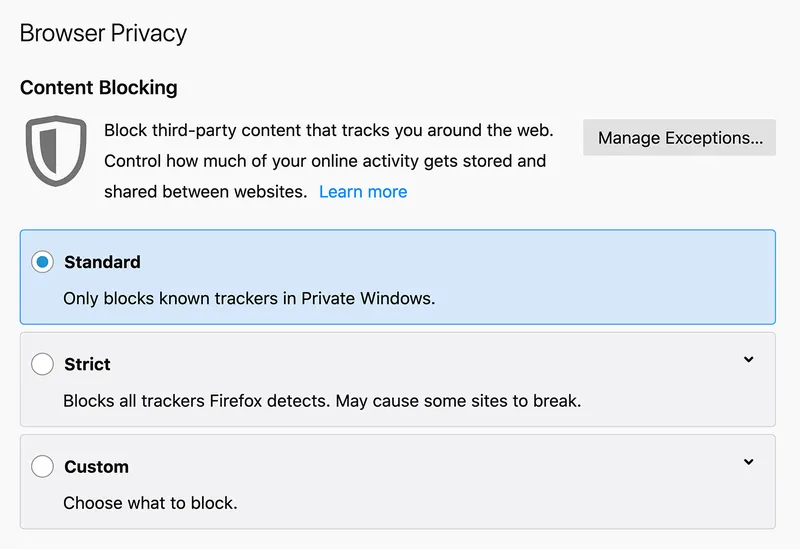
- Standard Mode: A balanced option that blocks common trackers while maintaining smooth website functionality.
- Strict Mode: Ideal for users who want stronger privacy protection by blocking more trackers and cookies. Note that some sites may require adjustments in this mode.
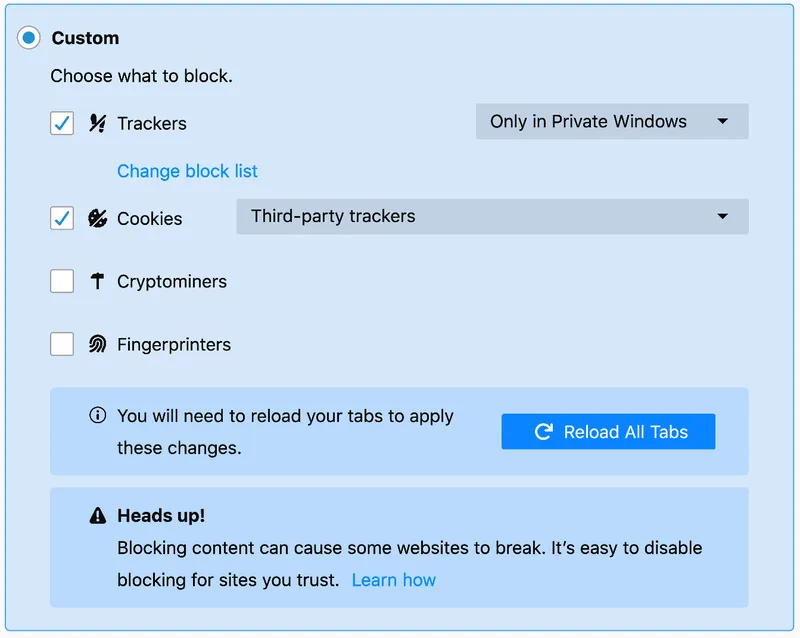
- Custom Mode: For those who want full control, Custom mode lets you select what to block, from cookies to trackers and more.
若要调整这些设置,请点击任意网页地址栏左侧的盾牌图标,选择“保护设置”,然后在打开的菜单中选择适当的保护级别。
为什么需要使用广告拦截器?
广告拦截器的作用不止于管理广告。在削减不必要的内容后,浏览速度和安全性同样得以提高。您可借此打造定制化的无干扰网络体验,以便专注于真正重要的事务。
探索可用于 Firefox 的数百款隐私为先的扩展,寻找称心的工具。现在就下载 Firefox,体验这款将隐私和性能根植于设计理念的浏览器吧。