
You’re in. Let’s put it to work.
Not sure where to begin?
Here are a few ways early testers found Smart Window super helpful.
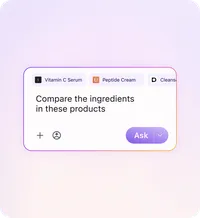
Clearer Comparisons
Multiple tabs on the same topic?
Ask Smart Window to lay out the key differences between options, so you can quickly see how they stack up.
Works great for: shopping, research, trip planning, and when you need a recommendation

Prompt to try: “Compare @Tab and @Tab. Which would you recommend based on [insert what matters to you, like price, ratings, quality, etc]”
What happens: Smart Window reads the tabs and gives you a single comparison. Click any of the tagged tabs to check the source.

Faster Recall
Forgot where you saw it?
Tell Smart Window to bring back pages from your recent activity, so you can pick up where you left off.
Also works for: finding one line in a long page, summarizing, or checking details quickly.
Prompt to try: “Show me the [describe the open tabs or sites you visited]”
What happens: Smart Window scans your open tabs and lists what it found.
Better Responses
Want more personalized answers?
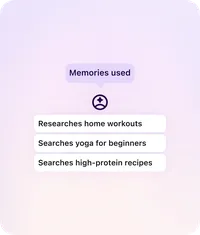
Give Smart Window permission to use memories — what it learns from your activity — so results are tailored to you. View, select, or delete them anytime in settings.
What to look for:
When a response uses memories, you’ll see the memories icon below. Click it to see what memories were used. Delete any memory you’d rather not keep. Or, “Retry without memories” for a less personalized response in the moment.