

Firefox
Your Firefox has been updated.

What’s New | Firefox 147

Start the year with Firefox as your main browser

Move through the web with less friction and more control.


Extensions to start the year your way

Handpicked by the Firefox team, these staff favorites — span privacy, productivity, and style — helping you personalize your browser and stay focused.
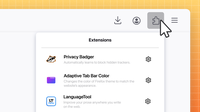

Extensions menu open from the toolbar, listing installed extensions.
A key ring holding your passwords, bookmarks, and other browser data.

Back up your Firefox — now on Windows 10

Automatically protect your bookmarks, passwords and history. Your data is safely stored on-device or in the cloud, ready whenever you need to move or reinstall Firefox.

What's new in Firefox Mobile

QR Code: Scan to install Firefox.

Fast, private translations — right on your device

Firefox for Android Firefox for iOS Translations

Read the web in another language, without sending pages to the cloud. No extra steps, no tracking — just safe, instant translations wherever you browse.

Scan to install
Start using private, on-device translations in seconds.

Recent improvements

A quick look at recent updates, from easier tab management and a more flexible PDF viewer to joining the AI Window waitlist

A tab group called Recipes with a drop-down list of the tabs it contains.

Tame your tabs

Drag tabs into groups without expanding them, keep key tabs visible when groups are collapsed, and hover to preview groups — tab chaos, controlled.

Illustration of the Firefox PDF viewer with annotation tools visible, a comment tool selected, and a highlighted text area being edited.

Make PDFs work for you

Comment, edit and clean things up right in Firefox — no extra tools needed. Use the sidebar to scan notes and jump to what matters.
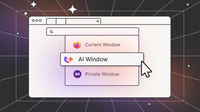
Window menu with Current Window, AI Window, and Private Window options.

AI in Firefox — built with you, not for you

Join the AI Window waitlist to try it early, share feedback, and help shape an opt-in, transparent approach to AI.

Keep up with all things Firefox

Get how-tos, advice and news to make your Firefox experience work best for you.