


Firefox Beta and Developer Edition
Release Notes
Release Notes tell you what's new in Firefox. As always, we welcome your feedback. You can also file a bug in Bugzilla or see the system requirements of this release.
Firefox Beta — English (US)
Your system may not meet the requirements for Firefox, but you can try one of these versions:
Firefox Beta — English (US)
-
Download Firefox Beta

-
Download Firefox Beta
-
Download Firefox Beta
-
Download Firefox Beta
-
Download Firefox Beta
-
Download Firefox Beta
-
Download for Linux 64-bit
-
Download for Linux ARM64
-
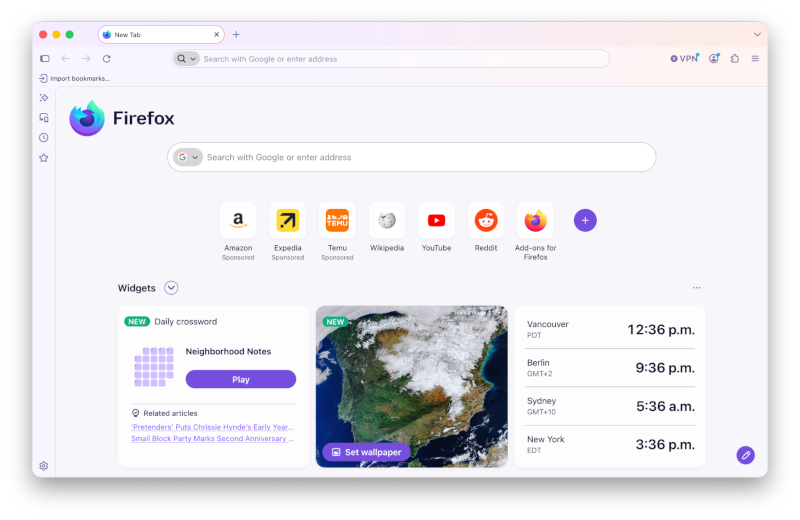
Firefox's biggest visual refresh in years, internally referenced as Project Nova, is now available on Beta, with a modernized look across the browser chrome, sidebar, and menus built with our updated design system. It also includes:
- New built-in themes with light and dark versions, so you can personalize the look of Firefox in a click.
- A new compact mode that reduces toolbar and tab spacing to give you more room for web content, useful on smaller screens and in split-screen layouts.
-
Localized suggestions in your address bar are now available in Austria, Belgium, Czech Republic, Denmark, Finland, Hungary, Ireland, Luxembourg, Netherlands, Norway, Poland, Portugal, Slovakia, Spain, Sweden, and Switzerland. You can control the suggestions in your Firefox Suggest settings.
Get the most recent version
Firefox Beta — English (US)
Your system may not meet the requirements for Firefox, but you can try one of these versions:
Firefox Beta — English (US)
-
Download Firefox Beta
-
Download Firefox Beta
-
Download Firefox Beta
-
Download Firefox Beta
-
Download Firefox Beta
-
Download Firefox Beta
-
Download for Linux 64-bit
-
Download for Linux ARM64