


Firefox Beta and Developer Edition
Release Notes
Release Notes tell you what's new in Firefox. As always, we welcome your feedback. You can also file a bug in Bugzilla or see the system requirements of this release.
Firefox Beta — English (US)
Your system may not meet the requirements for Firefox, but you can try one of these versions:
Firefox Beta — English (US)
-
Download Firefox Beta

-
Download Firefox Beta
-
Download Firefox Beta
-
Download Firefox Beta
-
Download Firefox Beta
-
Download Firefox Beta
-
Download for Linux 64-bit
-
Download for Linux ARM64
-
High Dynamic Range (HDR) video playback is now available on Windows - this feature needs HDR mode enabled for the display in Windows Settings - Display. Laptop displays that only offer "HDR video streaming" are not supported at this time. Some videos recorded on phones in certain orientations are currently not shown as HDR.
-
Containers let you keep separate parts of your online life (work, shopping, personal, banking) logged into different accounts in the same browser window, but keep your cookies and ad tracking isolated inside each container.
-
It is now possible to merge multiple PDFs by dragging a PDF into the PDF sidebar.
-
It is now possible to add images as new pages within PDFs using the Firefox PDF editor.
-
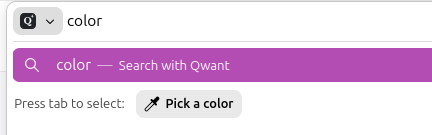
Quickly pick and copy a color from any page by typing "pick color", "color picker", or "eyedropper" in the address bar and selecting the "Pick a color" quick action.
-
Added support for Apple's system-wide full-screen keyboard command (Globe-F).
-
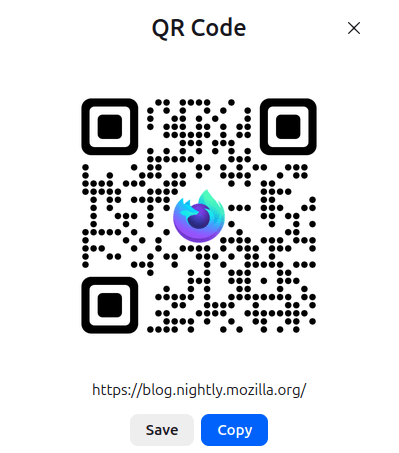
Share any open page with a QR code. Right-click a tab, select Share > Generate QR Code. Great for posters, invitations, banners, and other printed materials. On macOS, you can also right-click the address bar to access the Share menu.
-
Firefox now verifies and displays Qualified Website Authentication Certificates (QWACs) in accordance with eIDAS regulations.
-
Added improved support for videos with overlays so users can more easily access video actions from context menus.
-
Firefox now highlights the location permission icon in red whenever a website has access to your location. The permission icon is also now visible on search results pages where it was previously hidden.

-
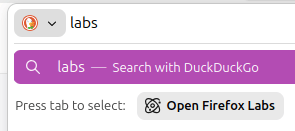
Firefox Labs can now be opened quickly by typing "labs" or "experiment" in the address bar and selecting the Open Firefox Labs quick action.
-
Firefox now offers experimental support for the new JPEG XL image format, which generally provides better compression than WebP, JPEG, PNG, and GIF and is designed to supersede them. You can enable it from the Firefox Labs panel in Settings.
Get the most recent version
Firefox Beta — English (US)
Your system may not meet the requirements for Firefox, but you can try one of these versions:
Firefox Beta — English (US)
-
Download Firefox Beta
-
Download Firefox Beta
-
Download Firefox Beta
-
Download Firefox Beta
-
Download Firefox Beta
-
Download Firefox Beta
-
Download for Linux 64-bit
-
Download for Linux ARM64